
You know the moment you want to find in your archive. A player's goal against a certain opponent. A match-winning moment. A compilation of the best moments from an athlete.
Until now, getting to it meant stacking four to six tag filters by hand: pick the player, pick the action, pick the collection, pick the match, then check you got the combination right. It works great, but it takes time.
So we sped it up. Introducing Smart Search in ScorePlay.
What Smart Search is
Smart Search lets you type one plain sentence instead of building filters piece by piece. Write "monfils celebrating" or "penalty scored by Oyarzabal," hit Enter, and Smart Search does the filter work for you.
Smart Search reads your sentence together with your own organization's tags and players, then turns your words into a normal search you can see. Your query comes back as editable chips above your results, so you always know exactly what ran. If it read you wrong, you fix it in one click.
It is not guessing, and it is not a chatbot. And classic tag search stays right where it was. One button flips you back, and you lose nothing.
How it works, in plain words
Say you type "Monfils celebrating."
Smart Search reads it against your library and builds a search for you:
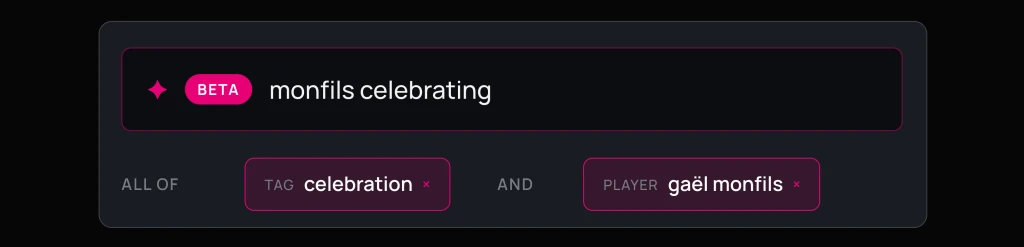
It then looks across your tags, your descriptions, and your filenames at the same time, and returns everything that matches, ranked with the closest matches first.
Every tag it uses is pulled from your own library, so the results speak your team's language. And it only ever searches what you are allowed to see. Content outside your permissions is never read and never shows up, so you can search freely without worrying about surfacing something you shouldn't.
How to use it
Smart Search is on the ScorePlay platform now, on your main media library and inside any collection.
1) Open your media library, or open a collection.
2) Click the Smart button on the right of the search bar to turn it on.
3) Describe the clip you're looking for in plain words, then hit Enter.
4) Check the chips it built above your results. Add, remove, or swap any of them without leaving the page. Want to widen the net or narrow it down? Edit a chip and the results update.
5) Open, download, or share what you found, the same as always. To go back to picking tags by hand, click Classic at any time.
A few things worth knowing
Smart Search is in beta and rolling out to all ScorePlay customers now. It is opt-in per user, so turning it on is your choice and does not change anything for your teammates.
Log in now, open your library, and click Smart. Then describe a clip the way you'd say it to a colleague: "mbappé and messi hug," "kyrgios tweener,"" "rodri lifting the trophy."
All it takes is one sentence.